
Indicator Accessories
Option modules are chosen by indicator model first and by protocol second.
Free shipping across the USA.
Not sure which module?
Indicator Accessories catalog

Internal Power Supply
Fits TI-500E SS
Mains supply inside the TI-500E SS enclosure, so there is no adapter left outside to keep dry.

Universal AC Adapter, 6 VDC
Fits the TI-500 family
600 mA female barrel, for the TI-500 family. Also listed under Adapters and Power Cords.

Rechargeable Battery NP3-6
Fits TI-500 SL · TI-500 BWL · WB5040-SWP
The 6 V 3 Ah sealed pack for the rechargeable indicators. Also listed under Batteries.
RS-232 Interface
Fits TI-500 RF · TI-500 FDI · TI-500 RF SS · TI-700K
A second serial port for a printer, a remote display or a PC.
Additional RS-232 Interface
Fits TI-1680
A second independent RS-232 channel on the TI-1680, so a printer and a logger can each have one.
RS-232 Interface, isolated
Fits TI-500 RF · TI-500 FDI · TI-500 RF SS · TI-700K · TI-1680
The same port with galvanic isolation, for runs between buildings or anywhere near a large drive.
RS-485 Interface, half duplex
Fits TI-500E Plus · TI-500E SS · TI-1520
Multi-drop Modbus over a long two-wire run.
RS-485 Interface, isolated
Fits TI-700K · TI-1680
The same protocol, isolated, under a different part number.
USB Interface
Fits TI-500 RF SS · TI-1680
Direct connection to a PC without a serial adapter.
Ethernet Interface
Fits TI-500 RF SS · TI-1680 · LCT-2
A wired network drop.
Wi-Fi Interface
Fits TI-500 RF SS · TI-700K · TI-1680
The same network job without pulling a cable.
Bluetooth COM 2.0, 100 m
Fits TI-500 RF SS · T831 · TI-1680
Class 1 Bluetooth with an internal antenna.
Bluetooth COM 2.0, 100 m
Fits TI-500 RF · TI-500 FDI · TI-700K
The same range and the same protocol, for the other indicator group.
Bluetooth COM 2.0, 1000 m
Fits TI-500 RF SS · T831 · TI-1680
Long-range Bluetooth for a yard or a large plant.
Bluetooth COM 2.0, 1000 m
Fits TI-500 RF · TI-500 FDI · TI-700K
Long range again, for the other indicator group.
Bluetooth COM 4.0 BLE
Fits TI-500 RF · TI-500 FDI · TI-500 RF SS · TI-700K · TI-1680
Bluetooth Low Energy, which is what a phone or tablet app expects. The widest fitment of the four Bluetooth parts.
G-PREM-BT Bluetooth Module
Fits G-700K · TI-700K
Bluetooth for the G-700K, the Guardian Premium indicator. A separate family from the TI series.
G-PREM-WIFI Wi-Fi Module
Fits G-700K
Wi-Fi for the G-700K, so a Guardian Premium floor scale reports to the network.
Analog Output, active
Fits TI-500 RF · TI-500 RF SS · TI-500E Plus · TI-500E SS · TI-700K · TI-1520
Drives its own 4-20 mA or voltage signal into a PLC input.
Analog Output, loop powered
Fits TI-500E Plus · TI-500E SS · TI-1520 · TI-1680
The receiving device powers the loop, which is what most installed 4-20 mA systems expect.
6V Relay Outputs
Fits TI-500 RF · TI-500 RF SS
Switches a feeder or a valve at a target weight, which is how simple batching happens without a PLC.
Time / Date / Print Formats
Fits TI-500E Plus · TI-500E SS
A firmware option, not a card. Puts a timestamp and a chosen layout on the printed ticket.
Spare Internal Power Supply
Fits indicators built with an internal supply
The replacement part for an indicator already built with an internal supply.
USB 2.0 Cable, 6 foot
For the USB Interface
The lead that goes with the USB interface. Six feet, standard A to B.
18″ Post with Swivel
For Guardian floor scales
Lifts the indicator off the deck of a Guardian floor scale and lets it turn to face the operator.
Custom & OEMWe also build the ones that aren’t in any catalog. Learn more
A module is an option on an instrument. Not a thing that works on its own.
Everything on this page plugs into something else. If you have not chosen the instrument yet, start there, because the instrument is what decides which of these modules exist at all.
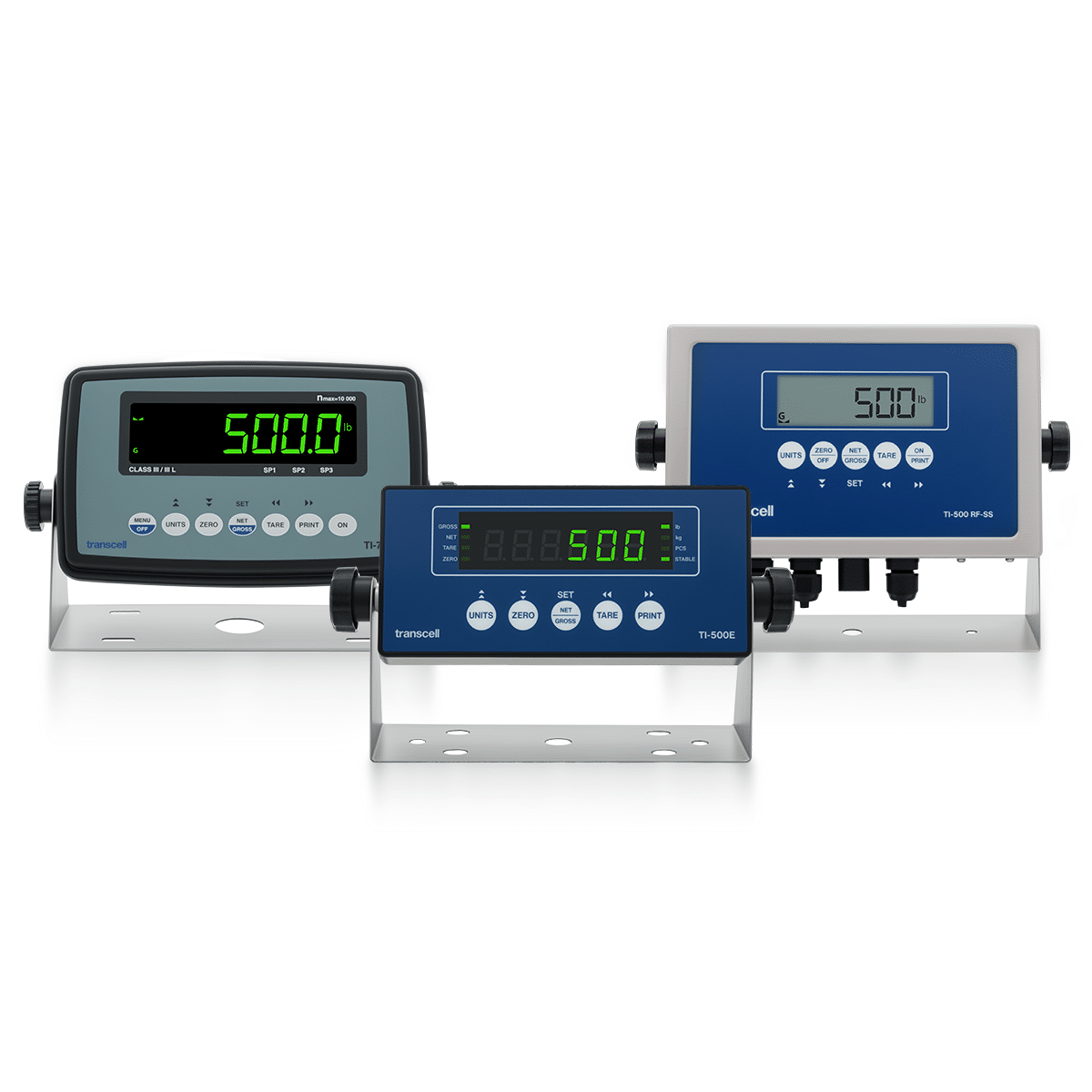
Digital Indicators
Fourteen weight and force readouts. Pick the model first: it is the model, not the protocol, that decides which modules are available.
View products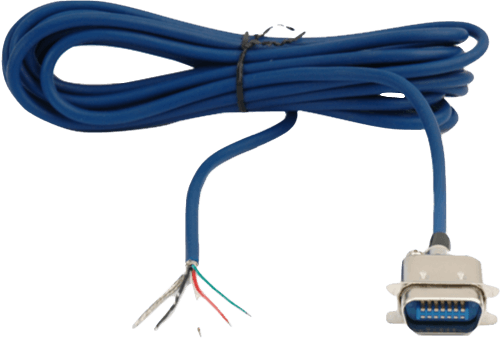
Cables
A port is only half a connection. The serial leads, the load cell cable and the quick disconnect assemblies live here.
View products
Printers & Thermal Paper
The commonest thing on the other end of an RS-232 port, and the reason most of these modules get ordered at all.
View productsWhy Transcell. Ordered like a store, backed like a partner.
Free 2-day shipping
Every USA order ships free in two days, Alaska and Hawaii included, with no minimum purchase.
Ships worldwide
International orders ship at FedEx live rates: what FedEx charges is what you pay.
Warranty backed
Every product ships with a manufacturer warranty, supported by the people who wrote the firmware these modules talk to.
Custom when you need it
A protocol, a register map or a connector that is not on this list is ordinary engineering work for us rather than a special request.
Indicator option reference
These twenty-five parts are options on an instrument rather than products that stand alone, and almost every ordering mistake on this page comes from reading them the other way round. Below: how to choose one, what actually happens when a module is fitted, a table that turns a requirement into a part number, the full fitment matrix by indicator model, and the vocabulary a datasheet assumes you already have.
How to choose an option module. Model first, protocol second.
Most of this page is options fitted inside an instrument, which makes the ordering logic different from the rest of the catalog. The instrument you own decides which modules physically exist for it; only after that does the question of which protocol you want become answerable.
Can I buy one of these on its own?
Nearly every module on this page carries the same sentence on its product page: "This item is not available for purchase separately and must be purchased with one of the following compatible indicators or kits." Read plainly, that means these are factory-fitted options specified when the instrument is built, not spares you add later.
These are ordered with the instrument. A module is a card that seats inside the indicator's enclosure against a specific connector, so fitting one to an instrument already in service means opening a sealed housing, and on a legal-for-trade scale it means breaking the inspector's seal. That is a service operation rather than a parcel.
So the way to order one is to add it to the same cart as the indicator: it is fitted and tested before the indicator ships. If you are adding capability to an instrument you already own, talk to us first, so the module arrives with the right firmware and the instrument comes back sealed.
Five items on this page are not modules and are sold on their own: the Internal Power Supply, the NP3-6 rechargeable battery, the 6 VDC universal AC adapter, the 6 ft USB 2.0 cable and the 18″ post with swivel.
Why are there two of several of these?
This is the single most expensive mistake available on this page, and it looks nothing like a mistake at the moment you make it.
Bluetooth COM 2.0 at 100 m exists twice. One part, at $230, fits the TI-500 RF SS, T831 and TI-1680. The other, at $225, fits the TI-500 RF, TI-500 FDI and TI-700K. Identical protocol, identical range, near-identical description, five dollars apart, and not interchangeable.
The same split repeats at 1000 m, at $330 and $315. And RS-485 splits the same way, though there the names differ slightly: half duplex for the TI-500E Plus, TI-500E SS and TI-1520, isolated for the TI-700K and TI-1680.
The reason is electrical rather than commercial. The indicators are different designs with different internal buses, and one of the RS-232 modules states the constraint outright: it needs a 3.3 V port. A module built for a 3.3 V bus is not a module built for a 5 V one, whatever the protocol on the outside says.
So the rule is short: find your indicator in the fitment table first, then read across to the protocol. Searching by protocol and taking the first result that matches is how the wrong part gets ordered.
Active or loop powered, for an analog output?
Both analog modules give you a signal a PLC can read, and they cost within five dollars of each other, so the choice is purely about how the current loop is powered.
Analog Output, active at $140 supplies the loop current itself. The indicator drives the signal and the receiving input simply measures it. Use it when the PLC card is a passive input, and when nothing else is already energising the loop.
Analog Output, loop powered at $135 does the opposite: the receiving device supplies the loop voltage and the module modulates the current drawn from it. A great many installed 4-20 mA systems are built this way, because it halves the wiring and puts the power supply at the panel end.
They also fit different instruments, which narrows the choice further. Active covers the TI-500 RF and RF SS, TI-500E Plus and E SS, TI-700K and TI-1520; loop powered covers the TI-500E Plus, TI-500E SS, TI-1520 and TI-1680. If your indicator appears on only one of those lists, the decision has already been made for you.
The failure mode when this is wrong is quiet rather than dramatic: two active devices fight and the reading is nonsense, while two passive devices leave a dead loop sitting at zero. Neither looks like a wiring fault, which is why it is worth settling on paper.
What if I just need a printed ticket?
It is worth saying plainly, because it saves people money: RS-232C is standard on every Transcell indicator. If the plan is a weight ticket on a thermal printer, the port is already there and the only thing missing is a lead.
What the RS-232 modules on this page actually add is a second serial port, or an isolated one. The second port matters when a printer and a data logger both need a permanent connection. Isolation matters when the two ends of the run sit at different ground potentials, which is normal between buildings and around large motor drives, and which otherwise shows up as corrupted characters or a port that fails intermittently.
So the order of questions is: do you need a port at all, or a lead? If a lead, it is on the Cables page. If a second port, or an isolated one, it is here.
The Time / Date / Print Formats option is the other thing people are often really after. It is firmware rather than hardware, and it is what puts a timestamp and a chosen layout on the ticket, which is usually the actual requirement behind "we need it to print properly".
Which of these are not communication at all?
The page reads as a list of interfaces, but a good third of it is not about data.
6V Relay Outputs at $235 are contacts that close at a target weight. That is what makes simple batching possible with no PLC in the loop at all: the indicator itself stops the feeder. It fits the TI-500 RF and TI-500 RF SS.
Time / Date / Print Formats is a firmware option for the TI-500E Plus and TI-500E SS, covered above.
Internal Power Supply at $44 moves the mains supply inside the TI-500E SS enclosure. On a washdown scale that is a real benefit rather than a tidiness one: an external adapter is the part of a stainless installation that is not actually sealed. The Spare Internal Power Supply at $92 is the replacement for an instrument already built that way.
And the 18 inch post with swivel is pure mechanics: it lifts the indicator off the deck of a Guardian floor scale and lets it rotate to face whoever is loading.
What fitting a module actually involves. And why it is not a parcel.
Understanding the physical shape of the job explains the ordering rule. A module is a card inside a sealed instrument, not a plug on the outside of one.
01
The indicator is opened
Every module seats inside the enclosure. On a stainless washdown instrument that means breaking the environmental seal, which is why it is done at the factory rather than at a bench.
02
It seats on a specific port
The card mates with a connector on the main board. One of these modules names the constraint outright, a 3.3 V port, which is exactly why the same protocol needs two different parts across the range.
03
Firmware recognises it
The instrument has to know the card is there and how to talk to it. That is why a module and an instrument are matched, and why the fitment lists are specific rather than approximate.
04
It is configured, not detected
Baud rate, addressing, demand or continuous output, and for an analog card the span across the weighing range. These are settings, so decide them before the order rather than after.
05
The instrument is closed and sealed
Re-sealed for washdown, and on a legal-for-trade scale re-sealed by a weights and measures inspector. That last step is the real reason to specify the module up front.
The practical consequence is that adding a module later costs more than the module. Deciding at the point you buy the indicator that a PLC will eventually need the weight is much cheaper than discovering it two years in, because by then the price includes opening, re-sealing and, on a certified scale, re-inspection.
What are you trying to connect? The requirement, then the part.
Read down the left column for what has to receive the weight, then check the part against your own indicator in the fitment table below. Both halves have to agree.
| If you need | The part | Why |
|---|---|---|
| A printed weight ticket | Nothing from this page | RS-232C is standard on every indicator in the range. You need a lead and a printer, not a module. Add Time / Date / Print Formats only if the ticket has to carry a timestamp. |
| A second serial device on the same indicator | RS-232 Interface $110 | Adds a port rather than replacing one, so a printer and a logger can each hold a permanent connection. The TI-1680 has its own second-port part number. |
| Serial between buildings, or near drives | RS-232, isolated $125 | Galvanic isolation breaks the ground path between the two ends. Without it, a difference in ground potential shows up as corrupted characters rather than as an obvious fault. |
| Several instruments on one run | RS-485 $110 | Multi-drop addressing over two wires, and far better noise immunity than RS-232 over distance. Check which of the two RS-485 parts your indicator takes. |
| A PLC analog input | Analog Output $140 | 4-20 mA or a voltage signal onto a standard input card. Choose active or loop powered by which end supplies the current, not by price. |
| The weight in a network application | Ethernet $210 | A wired drop straight into software. The Wi-Fi module does the same job where pulling a cable to the scale is the hard part. |
| A reading on a phone or tablet | Bluetooth 4.0 BLE $125 | Low Energy is what a modern mobile app expects. It also has the widest fitment of the four Bluetooth parts, which makes it the safer specification. |
| A readout across a yard | Bluetooth 2.0, 1000 m $330 | Class 1 at long range. There are two part numbers at this range for different indicator groups, so confirm the model before ordering. |
| To stop a feeder at a target weight | 6V Relay Outputs $235 | Contacts that switch at setpoint, which is simple batch control without a controller. Not a communication option at all. |
| A washdown scale with nothing outside the enclosure | Internal Power Supply $44 | On a stainless instrument the external adapter is the weak point of the installation. This moves the supply inside the sealed housing. |
| Several load cells summed before the indicator | A junction box | Not an indicator option. Summing and trimming happen before the signal reaches the instrument, so that is a separate box in the chain. |
What fits what. Read your indicator, then read across.
Fitment is taken from each module's own product title, the most specific statement Transcell makes about it.
| Module | Price | Fits these indicators |
|---|---|---|
| Serial | ||
| RS-232 Interface | $110 | TI-500 RF, TI-500 FDI, TI-500 RF SS, TI-700K. Also the Alpha XR, Delta XR and Foxtrot XR RF kits, Guardian Series RF floor scales and wireless weigh beam scales, all of which need a 3.3 V port. |
| Additional RS-232 | $110 | TI-1680 only. This is the second channel on an instrument that already has one. |
| RS-232, isolated | $125 | TI-500 RF, TI-500 FDI, TI-500 RF SS, TI-700K, TI-1680, plus the RF kits and Guardian RF floor scales. |
| RS-485, half duplex | $110 | TI-500E PLUS, TI-500E SS, TI-1520. |
| RS-485, isolated | $110 | TI-700K, TI-1680. |
| Network and wireless | ||
| USB Interface | $110 | TI-500 RF SS, TI-1680. |
| Ethernet Interface | $210 | TI-500 RF SS, TI-1680, and the LCT-2 weight transmitter. |
| Wi-Fi Interface | $101.65 | TI-500 RF SS, TI-700K, TI-1680. |
| Bluetooth 2.0, 100 m | $230 | TI-500 RF SS, T831, TI-1680. Internal antenna. |
| Bluetooth 2.0, 100 m | $225 | TI-500 RF, TI-500 FDI, TI-700K. Same protocol and range as the row above, different part. |
| Bluetooth 2.0, 1000 m | $330 | TI-500 RF SS, T831, TI-1680. |
| Bluetooth 2.0, 1000 m | $315 | TI-500 RF, TI-500 FDI, TI-700K. |
| Bluetooth 4.0 BLE | $125 | TI-500 RF, TI-500 FDI, TI-500 RF SS, TI-700K, TI-1680. The widest fitment of the Bluetooth options. |
| G-PREM-BT | $130 | TI-700K and G-700K, Guardian Series RF floor scales, Guardian Premium floor scales, wireless weigh beam scales. |
| G-PREM-WIFI | $190 | G-700K, on the Guardian Premium and Guardian Premium RF floor scales. |
| Control and analog | ||
| Analog Output, active | $140 | TI-500 RF, TI-500 RF SS, TI-500E Plus, TI-500E SS, TI-700K, TI-1520. |
| Analog Output, loop powered | $135 | TI-500E PLUS, TI-500E SS, TI-1520, TI-1680. |
| 6V Relay Outputs | $235 | TI-500 RF, TI-500 RF SS. |
| Time / Date / Print Formats | $120 | TI-500E PLUS, TI-500E SS. A firmware option rather than a card. |
| Power and mounting | ||
| Internal Power Supply | $44 | TI-500E SS. |
| Spare Internal Power Supply | $92 | Instruments already built with an internal supply. |
| Rechargeable Battery NP3-6 | $50 | TI-500 SL, TI-500 BWL, WB5040-SWP, and the legacy TI-500BW, TI-1510, TI-1200, TI-1000 and TI-1001. |
| Universal AC Adapter, 6 VDC | $25 | TI-500, TI-500RF, TI-500 FDI-1 and FDI-2, RF kits, WB5040-AWP, TI-300E, TI-500BWL on C-size batteries. |
| USB 2.0 Cable, 6 foot | $25 | The lead for the USB interface. |
| 18″ Post with Swivel | $35 | Guardian floor scales. |
Where a module names an RF kit or a Guardian floor scale as well as an indicator, that is because those products contain one of these indicators. The constraint is always the instrument inside, which is also why a 3.3 V port is named on one row and not on others: it is a property of the board, not of the protocol.
Interface terms, in plain language. What they mean when you're specifying.
Show all 20 terms
- Option module
- A card fitted inside an indicator to add a port or a capability. Specified with the instrument rather than added to it later, because fitting one means opening the enclosure.
- RS-232C
- The point-to-point serial standard already fitted to every Transcell indicator. One device at each end, tens of metres, and no addressing.
- RS-485
- A two-wire serial standard that allows several devices on one run with addresses, and survives electrical noise far better than RS-232 over distance.
- Modbus RTU
- The message format usually carried over RS-485. It defines how a controller asks for a register and how the instrument answers.
- Half duplex
- One pair of wires carrying traffic in both directions but only one way at a time. Normal for RS-485 multi-drop, and the reason devices take turns.
- Galvanic isolation
- No direct electrical path between the two ends of an interface, so a difference in ground potential cannot drive current through the signal. What the isolated modules add.
- Ground loop
- A current flowing in a signal's ground because the two ends sit at different potentials. It corrupts data and, on a load cell run, looks exactly like a failing sensor.
- Multi-drop
- Several instruments sharing one cable, each answering to its own address. The reason a network of scales uses RS-485 rather than RS-232.
- 4-20 mA
- An analog current loop. Because information is carried as current rather than voltage, it is immune to voltage drop over distance, and a broken wire reads as zero rather than as a plausible weight.
- Active output
- An analog output that supplies its own loop current. Pair it with a passive input, and never with another active device.
- Loop powered
- An analog output powered by the receiving device, which modulates the current drawn from the loop. Halves the wiring and is what most installed systems expect.
- Setpoint
- A weight at which the instrument changes a relay state, used to stop a feeder or close a valve. What makes batching possible without a PLC.
- Relay output
- A contact the indicator opens or closes. It carries no data; it switches something.
- Class 1 Bluetooth
- The higher-power tier, reaching roughly 100 m unobstructed, with 1000 m versions for open sites. Bluetooth 2.0 here.
- BLE
- Bluetooth Low Energy, the 4.0 generation. Shorter range in exchange for battery life and native support in phone and tablet apps.
- Internal antenna
- The radio antenna sits inside the module rather than on a stub outside the enclosure, which keeps a washdown housing sealed.
- Demand vs continuous
- Whether the instrument sends a reading when PRINT is pressed or streams it constantly. A setting, not something the receiving end detects, so decide it before writing software.
- Firmware option
- A capability enabled in software rather than added as hardware. Time / Date / Print Formats is one, which is why it has no connector.
- 3.3 V port
- The internal connector voltage on some indicators. It is the reason the same protocol needs two different modules across the range, and it is a property of the instrument's board.
- Internal power supply
- A mains supply mounted inside the indicator enclosure, so a washdown installation has no external adapter to keep dry.
Option modules, answered.
Can I buy a module on its own and fit it myself?
Add it to the same order as the indicator and it is fitted and tested before the indicator ships. Fitting one yourself means opening the enclosure, and on a washdown or legal-for-trade scale breaking a seal, so if the indicator is already in service, talk to us before ordering. The exceptions are the five items that are not modules: the Internal Power Supply, the NP3-6 rechargeable battery, the 6 VDC universal AC adapter, the 6 ft USB 2.0 cable and the 18″ post with swivel are sold on their own.
Why do two modules have the same name and different part numbers?
Because the indicators are different designs internally. Bluetooth COM 2.0 at 100 m exists as two parts, one for the TI-500 RF SS, T831 and TI-1680 and one for the TI-500 RF, TI-500 FDI and TI-700K, and the same split repeats at 1000 m and across RS-485. One of the RS-232 modules names the underlying reason outright: it needs a 3.3 V port. Always match the indicator model first and read the protocol second.
Do I need a module just to print a weight ticket?
No. RS-232C is standard on every indicator in the range, so a printer needs a cable rather than a card. The RS-232 modules here add a second port, or an isolated one for runs between buildings and near large drives. What people often actually want for a ticket is the Time / Date / Print Formats firmware option, which is what puts a timestamp and a chosen layout on the paper.
Should I order the active or the loop powered analog output?
It depends which end supplies the current. Active means the indicator drives the loop, so pair it with a passive PLC input. Loop powered means the receiving device supplies the voltage and the module modulates the current, which is how a great many installed 4-20 mA systems are built. They also fit different indicators, so check the fitment table: if your model appears on only one list, the decision is already made.
What is the difference between the Bluetooth 2.0 and 4.0 options?
Range against compatibility. Bluetooth 2.0 Class 1 reaches roughly 100 m, or 1000 m in the long-range versions, which suits a yard or a large plant with a dedicated receiver. Bluetooth 4.0 BLE trades range for battery life and for native support in phone and tablet applications, and it also has the widest fitment across the indicator range, which makes it the safer choice if the receiving device is somebody's handset.
Can I add a module to an indicator that is already installed?
Physically yes, practically it is a service job rather than a parcel. The card seats inside the enclosure, the firmware has to recognise it, and the instrument then has to be closed and re-sealed. On a stainless washdown housing that seal is what the IP rating depends on, and on a legal-for-trade scale it is the weights and measures seal, so the scale needs re-inspection afterwards. That is the real argument for specifying the module when you buy the indicator.
Do the G-PREM modules work on a TI-series indicator?
They are built for the G-700K, the indicator on the Guardian Premium and Guardian Premium RF floor scales, and those scales are where they are offered as add-ons. The G-PREM-BT also lists the TI-700K. For other TI-series indicators, use the Bluetooth COM and Wi-Fi Interface modules on this page, which list the TI models each one fits.
What are the relay outputs actually for?
Stopping something at a target weight. The contacts change state at a setpoint, so a feeder, a valve or a filler can be controlled directly by the indicator without a PLC in the loop. It is the cheapest route to simple batch control, and it is not a communication option at all despite sitting on the same page.
Is there a module that gets weight into a PLC without any wiring to the scale?
The Wi-Fi interface is the closest, and it fits the TI-500 RF SS, TI-700K and TI-1680. Whether the PLC can consume it depends on the control system rather than on the scale, so the practical question is what protocol the controller expects at the other end. If it wants a hard-wired analog input, no radio replaces that and you want the analog card instead.
Can you supply a protocol that is not on this list?
Yes. We design the electronics and write the firmware these instruments run, so a different register map, a fieldbus that is not listed, or a private-label variant is ordinary engineering work rather than a special request. Tell us the controller at the other end and what it expects to see.
We Make Your Challenge Our Business
Tell us what it has to do and we’ll tell you what it takes.